Single needle machines bring professional precision, yet they also welcome complete beginners with open arms. You get massive design libraries, automatic thread trimming, and WiFi connectivity without needing a degree in engineering. That balance of power and simplicity is exactly what makes these 10 models so beloved. Let’s break down which one fits your workspace, budget, and creative ambitions.
Brother PE900 Embroidery Machine with WLAN, White
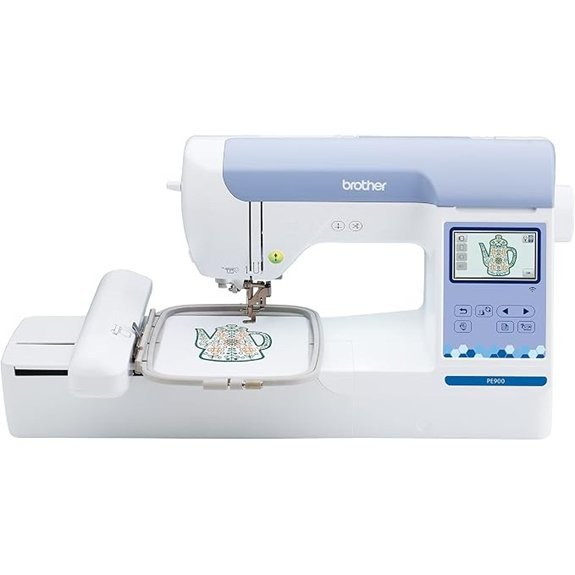
If you’re a dedicated embroiderer looking for a machine that focuses solely on stitching, without any sewing extras, the Brother PE900 is your best choice in the 10 Best Single Needle Embroidery Machines. Its 5” x 7” hoop handles larger designs, and the 3.7 inch LCD touchscreen makes editing a breeze. You get 193 built in designs, 13 fonts, and wireless file transfer via WLAN. The Artspira app access 50 free designs and custom patterns. Just update the firmware and jump right in. Beginners love the automatic needle threader and step by step tutorials. And at 21 pounds, it’s sturdy but manageable.
PooLin EOC03 Embroidery Machine WiFi 4×4 & 4×9.25
https://m.media-amazon.com/images/I/61iTBFJIuHL._AC_SX679_.jpg
The PooLin EOC03 hands you the perfect starting line. Its 4×4 and 4×9.25 inch hoops give you real variety for T-shirts, tote bags, or towels. You’ll appreciate the metal body and the clever Institch system that makes every stitch intuitive, not intimidating. Start right away with 130 built-in designs and 8 fonts. But you can also send custom patterns via WiFi. The generous starter kit means you won’t need extra supplies. And if you get stuck, you’ll find YouTube tutorials plus a community of 12,000+ enthusiasts ready to help. Free one-on-one engineer support is included too.
Poolin EOC05 Embroidery Machine for Beginners, 4″ x 9.25″ Embroidery Area
https://m.media-amazon.com/images/I/714bxaS6FZL._AC_SX679_.jpg
Poolin EOC05 is your best bet if you want a dedicated embroidery machine that skips sewing entirely. It’s built purely for stitching out designs, not for joining seams. You get a generous 4 by 9.25 inch embroidery area, perfect for sprucing up clothing, accessories, or home décor.
You’ll navigate the 7 inch color touchscreen with ease, thanks to the Institch OS2 interface. WiFi and USB let you transfer designs straight from your computer. And you’re not alone. The package includes two hoops, threads, stabilizers, and a starter kit. Plus you gain free design software, 1 on 1 training, and access to the PooLin user community. It’s a complete beginner’s package that skips the fluff.
POOLIN EOC06 Embroidery Machine, 7″ Touchscreen, 200 Designs
https://m.media-amazon.com/images/I/71HpL1XvwCL._AC_SX679_.jpg
You’re searching for a single-needle machine that balances premium features with beginner-friendly guidance, and the POOLIN EOC06 delivers exactly that. Its 7-inch color touchscreen makes steering through 200 built-in designs, 8 fonts, and 10 languages a breeze. You get four hoops, including a spacious 7.9×11 inch option for larger projects. Transfer designs wirelessly or via USB, then edit them using the included Institutch Doodle software. Stitch quality impresses across cotton and denim, but pay attention to bobbin setup to avoid jump stitch issues. A supportive Facebook group helps you troubleshoot. It’s a solid choice for creative freedom.
Brother SE700 Sewing and Embroidery Machine, Wireless
https://m.media-amazon.com/images/I/71YLqJx-ohL._AC_SX679_.jpg
Brother SE700 fits perfectly if you want a wireless, beginner friendly machine without sacrificing advanced features. You get a 3.7 inch color touchscreen for on screen editing, and you can transfer designs via WiFi from your PC or the Artspira mobile app. No need for cables. It’s a computerized workhorse with 135 built in embroidery designs, 103 sewing stitches, and a 4×4 embroidery area. The automatic needle threader and jam resistant drop in top bobbin save you time. And at 15.6 pounds, it’s portable enough for classes or guild meetings. Just pick up some extra thread and stabilizer to start.
Brother PE545 Embroidery Machine with 4 Hoops
https://m.media-amazon.com/images/I/81W4Se2QhxL._AC_SX679_.jpg
If you crave creative control without the learning curve, the Brother PE545 is your ideal companion. This embroidery‑only machine gives you a breezy, intuitive path to beautiful projects.
You’ll love its 3.7 inch touchscreen for on‑the‑fly editing, with 135 built‑in designs and 10 lettering fonts right at your fingertips. Stitch up to 400 stitches per minute, and let the auto threader and automatic thread cutter handle the grunt work.
Your bundle comes with four hoops: two 4×4 inch, one 4×6.75 inch, and a 2.5 inch hoop. Plus, you get 40 polyester thread spools (500 meters each), so you’re ready to go instantly.
Use the wireless LAN or Artspira app to transfer custom designs from your phone or PC. No USB needed. And the Drag‑and‑Drop feature lets you position patterns with a simple tap.
Weighing just 15 pounds and measuring 16.6x8x12 inches, it’s portable for craft nights or classes. You won’t find a more complete, user‑friendly machine for under $600.
Brother Skitch Single-Needle Embroidery Machine
https://m.media-amazon.com/images/I/61vXkQX9EyL._AC_SX679_.jpg
The Brother Skitch is the best choice for beginners who want a connected, app driven experience. You ditch USB drives entirely. Just Bluetooth pair with the Artspira app, import your PES, PHC, PHX, or DST files, and stitch up to 400 SPM. The 4” x 4” area handles most small projects, but you also get Free Arm capability for sleeves and cuffs.
You’ll appreciate the included 100 free artist designs upon registration. Plus, the app saves 20 designs for free. Need more? Artspira+ *accesses* 7,000+ embroidery designs, digitizing tools, and cross stitch conversion. And you get 61 colors and editable templates.
Everything arrives in the box: magnetic frame, scissors, needles, pre wound bobbins, thread, felt, and backing. It’s light at 22 pounds. Just don’t expect perfection, the 3.2 star rating reflects its simplicity over speed.
Brother PRS100 Single Needle Embroidery Machine Free Arm
https://m.media-amazon.com/images/I/719YKuhR5vL._AC_SX679_.jpg
Looking for a single needle machine that won’t shy away from caps, cuffs, or those tiny tricky spots on kids’ clothes? The Brother PRS100 delivers with its tubular free arm design, letting you slide sleeves and small garments right on.
You get four exclusive compact frames, ranging from 1.25 x 1.75 to 2 x 2 inches. Perfect for socks, headbands, and children’s clothes. A cap frame and driver set are included, so Disney characters on caps are fair game. Quick bobbin changes and a 4-spool thread stand keep your workflow smooth. The Droplight™ marker guarantees precise alignment.
It weighs 68.3 pounds with a metal build, stable for home use. And with a 4.5 star average rating, you’re getting reliable versatility.
Brother SE700 Embroidery & Sewing Machine with Hoops
https://m.media-amazon.com/images/I/81H72pz6pnL._AC_SX679_.jpg
Brother SE700 is your best pick if you value versatility without overspending. You get 135 built-in embroidery designs, 10 embroidery fonts, and over 103 sewing stitches right on that bright 3.2 x 1.8-inch color display, where you can edit designs on the fly. The bundle throws in four hoops, including the 4×4 inch and 4×6.75 inch sizes, plus 40 thread spools. You can transfer designs wirelessly from your PC or use the Artspira app. It’s an all-in-one workhorse for both sewing and embroidery, weighing just 15 pounds so you can move it easily.
Brother PE900 Embroidery Machine with 5-Piece Hoop Set
https://m.media-amazon.com/images/I/818EdEBpk0L._AC_SX679_.jpg
If you’re after a dedicated embroidery workhorse without the bulk of a combo machine, the Brother PE900 is your sweet spot. This single needle machine zips through designs at 650 stitches per minute, offering you a generous 5″ x 7″ area. You get 193 built in designs and 13 fonts, all editable on the 3.7 inch LCD touchscreen. Resize, rotate, or combine letters with ease.
The 5 piece hoop set includes sizes for every project:
- Two 5×7 inch hoops
- One 2.5 inch hoop
- One 12×5 inch hoop
- Four 4×4 inch hoops
Upload designs wirelessly via iBroidery or the Artspira app. And with 40 thread spools included, you’ll stitch straight out of the box!
Factors to Consider When Choosing a Single Needle Embroidery Machine
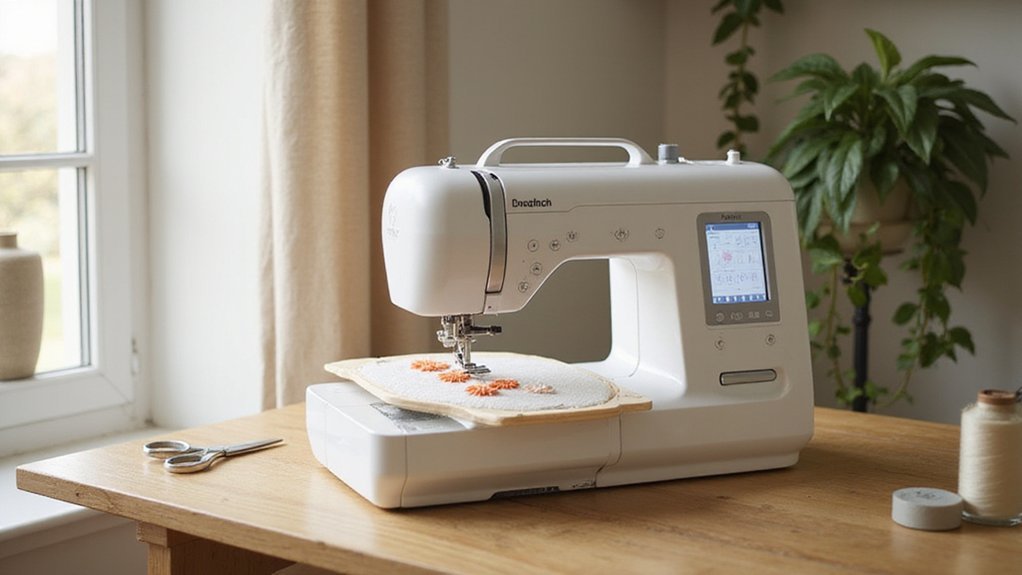
You’ll want to zero in on the embroidery area size first, as that dictates whether you can stitch a small monogram or a large, sprawling design in one go without rehooping. Next, consider the built-in design library and connectivity options: a machine loaded with quality patterns saves you setup time, while USB and Wi-Fi let you import custom designs from your computer. Finally, don’t overlook ease of use and machine weight, because a lightweight, intuitive machine with a color touchscreen makes your workflow smoother and lets you move it around your workspace without a backache!
Embroidery Area Size
One of the first things you will notice, when sizing up single needle machines, is that the embroidery area dictates the ceiling of your creative projects. Think of it as your canvas. A larger area, like 5” x 7” or even 7.9” x 11”, lets you tackle bigger, more intricate designs without re-hooping. That’s a game changer for complex motifs. Smaller spaces, such as 4” x 4” or 4” x 9.25”, are perfect for quick monograms or tiny embellishments, but they’ll limit your ambitions on larger pieces. Your choice directly impacts versatility. Some machines offer adjustable hoops or multiple sizes, which expands what you can do within that given area. So, match the size to your typical projects. A small hoop won’t cut it if you love big, detailed designs!
Built-In Design Library
Beyond the embroidery area, the built-in design library is your next big ally, especially when you want to jump straight into sewing without hunting for digital files. A robust library gives you immediate access to a variety of patterns, from florals and geometrics to diverse fonts, so you can start personalizing projects right away. Look for machines boasting over 100 built-in designs; that higher capacity means more creative flexibility at your fingertips. The quality of these internal designs matters too, they can elevate your finished piece to look professional, even if you’re a beginner. And don’t underestimate fonts. Machines with customizable font options let you add names or messages directly on the machine, giving you total creative control without extra software.
Connectivity Options
Two or even three connectivity options aren’t just a luxury, they’re a game changer for how you’ll actually use your machine day-to-day. USB keeps it simple, but WiFi and Bluetooth? That’s where the magic happens. With WiFi, you can send designs from your laptop across the room no cables needed. Bluetooth lets you pull patterns straight from your phone or tablet, slashing setup time to seconds. And many machines pair with dedicated apps for cloud access, so you’re never stuck starting over. Consider these:
- USB for direct flash drive loads
- WiFi for remote updates and computer transfers
- Bluetooth for quick smartphone imports
Having all three ensures you’re compatible with any device or software you love. It’s about flexibility not futzing. Prioritize machines that offer at least two wireless routes, your workflow will thank you.
Ease of Use
Connectivity matters little if the machine itself fights you at every stitch, so let’s talk about what actually makes a single needle model a joy to use right out of the box. You’ll want a touchscreen with step-by-step tutorials; it’s like having a patient guide built right in. Automatic needle threading saves your eyes and sanity, while auto thread trimming means less snipping and more creating. And don’t underestimate physical buttons for quick toggles, they’re faster than menu diving when you’re in the zone. Plus, on-screen editing lets you resize or rotate patterns without a computer degree. Finally, check for accessible support, think video libraries and active forums, because real ease of use includes knowing help is one click away when you hit a snag.
Machine Weight
One major factor you’ll want to weigh—literally—is the machine’s weight. Heavier models stay stable during operation, slashing vibrations that mess with stitch precision. You’re investing in durability; those extra pounds often mean higher-quality components, extending the machine’s lifespan. However, that stability comes with a trade-off.
Lighter ones are portable and easier to store, ideal if you’re short on space or need to move your setup often.
But here’s the catch: a light machine might not sit steady on a flimsy table. You’ll need a sturdy surface for heavier units, and relocating them can require a second pair of hands.
- Heavy duty: Best for dedicated workspaces.
- Light and portable: Perfect for small studios or taking to classes.
Choose based on where you’ll work, not just what feels easy to lift.