Remember when a patch was just an iron-on afterthought? You’re about to see how far the craft has come. These eight machines turn that idea on its head, so let’s walk through what each one actually delivers for your projects.
POOLIN EOC06 Embroidery Machine with 7″ Touchscreen
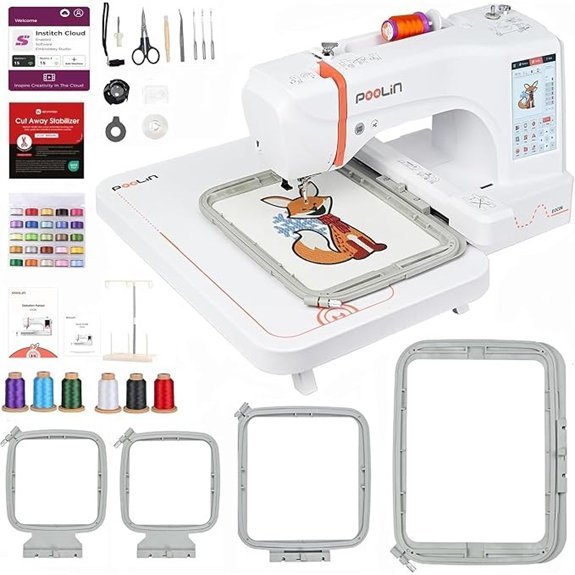
If you’re just stepping into the world of patch making and want a machine that grows with you rather than intimidating you, the POOLIN EOC06 is the best choice for absolute beginners who still demand professional results. Its 7-inch touchscreen makes navigation a breeze, so you’ll tweak settings and pick from 200 built-in patterns without cracking a manual. You’ll appreciate the four hoops, including a roomy 7.9×11 inch option, which lets you scale from tiny emblems to larger back patches.
Wireless transfer is where this machine shines; you’ll skip cables and send designs straight from your phone or laptop. For original works, pair it with Institch Doodle software and export in DST or DSB formats. Stitch quality holds up on denim and cotton, and adjustable speed gives you control during tricky corners. Just watch your bobbin tension, as a few users note jump stitches need a quick setup check.
You’ll find a supportive Facebook community and engineer-backed support if you hit a snag. For $350-ish, you’re getting solid value, and the included thread rolls and stabilizers mean you’ll start patching right out of the box. It’s not perfect, but for learning and creating with confidence, it’s a friendly workhorse.
Janome Memory Craft 100e Embroidery Machine 5.5×5.5in, 274 Designs
https://m.media-amazon.com/images/I/51KHnwBo-yL._AC_SX679_.jpg
The Janome Memory Craft 100E is a dedicated home embroidery machine, so it focuses solely on stitching without the added complexity of sewing functions. That means you get 274 built-in designs and 11 monogramming fonts at your fingertips. Use the 3.5-inch color touchscreen to resize, rotate, or combine designs on the fly. No computer needed. Want to embroider a sleeve or pant leg? Slide it onto an optional free arm hoop. The 5.5 x 5.5-inch area handles patches beautifully. Plus, optical bobbin monitoring alerts you before thread runs out. Auto return after a break keeps your workflow seamless. It’s compact at 20 pounds and dual voltage, so you can take it to classes.
Brother PE545 Wireless Embroidery Machine 4×4 Hoop LCD
https://m.media-amazon.com/images/I/71o10cZrVWL._AC_SX679_.jpg
You get a dedicated embroidery powerhouse with the Brother PE545, and it’s perfect for anyone who wants professional patches without the bulk of a sewing machine. Its wireless LAN lets you transfer files from your PC using free Design Database Transfer software, or you can plug in via the built in USB port. The large 3.7 inch LCD color touchscreen gives you drag and drop design positioning, editing, and previewing before you stitch.
Here’s what you get right out of the box:
- 135 built in designs: seasonal, floral, and kids’ patterns
- 10 fonts for lettering: seven English, three Japanese
- 4×4 inch embroidery field with included hoop
- Starter kit with needles, bobbins, scissors, seam ripper, and dust cover
Wireless transfer also works with the free Artspira app for designing on your mobile device. Plus you get a 2 year warranty on electronics, with 25 years on the chassis casting.
Brother Skitch Embroidery Machine with Artspira App
https://m.media-amazon.com/images/I/61vXkQX9EyL._AC_SX679_.jpg
Brother’s Skitch is your best bet if you want a machine that pairs with your phone instead of a computer, making it the top pick for smartphone-savvy beginners. You’ll stitch up to 400 stitches per minute with its 4” x 4” hoop, and import your PES or DST files via Bluetooth (no USB needed). Artspira app saves 20 designs free, or upgrade to Artspira+ for advanced digitizing, cross stitch tools, and access to over 7,000 embroidery designs. Plus, you get 100 free artist designs just by registering. It even has free arm capability, letting you tackle tote bags and sleeves without a struggle. And at 22 pounds, it’s portable enough to move from room to room.
Brother SE700 Sewing and Embroidery Machine
https://m.media-amazon.com/images/I/71YLqJx-ohL._AC_SX679_.jpg
Patches come together fast on this wireless-equipped workhorse. You’ll zip through designs with its 135 built-in embroidery patterns and 10 fonts, all managed on that 3.7-inch color touchscreen. You can preview edits right on screen, so what you see is what you stitch. Transfer your own artwork via WiFi using the Artspira app or Design Database Transfer, no cables needed. Sewing hits up to 710 stitches per minute, and the automatic needle threader saves your sanity. The 4×4 hoop handles patches perfectly, though you’ll want extra stabilizer for stretchy fabrics. Just grab colored thread and hoop up, then let the jam-resistant bobbin do its thing.
Brother SE700 Combo Sewing & Embroidery Machine
https://m.media-amazon.com/images/I/81H72pz6pnL._AC_SX679_.jpg
This SE700 is your best bet if you want a true hybrid machine for both sewing and embroidery. The 3.2-inch color touchscreen feels intuitive, letting you adjust designs directly on-screen, and the wireless LAN means you’ll send custom files straight from your PC without messy cables. You’ll find 135 built-in embroidery designs, 10 fonts, and 103 stitches, but the real kicker is the bundle: four hoops (including the 4×6.75-inch), 40 thread spools, and a full accessory set. Weighing just 15 pounds, it’s portable enough to tuck away, yet stable during dense stitching. For patch-making beginners, this machine’s auto-size buttonholes and built-in tutorials make the learning curve surprisingly gentle. Just don’t lose the twin needle, you’ll want it for that professional edge.
Brother PE900 Embroidery Machine with WLAN, White
https://m.media-amazon.com/images/I/61AuzUPq+EL._AC_SX679_.jpg
For patch makers who want crisp, pro-level results without wrestling with a combo machine, the Brother PE900 is a dedicated embroidery powerhouse. Its 5” x 7” field handles larger patches beautifully, and the 3.7-inch touchscreen makes editing a breeze: you can resize, rotate, or combine designs right on screen. The WLAN and Artspira app let you send designs wirelessly, plus you get 193 built-in patterns and 13 fonts. Advanced Color Sort and Jump Stitch Trimming save thread and time. You’ll appreciate the auto needle threader and built-in tutorials, though remember, it’s strictly embroidery. At 21 pounds, it’s sturdy but portable.
Brother PE900 Embroidery Machine, 5 x 7″ Field, Ultimate Embroidery Kit
https://m.media-amazon.com/images/I/915zajX4yYL._AC_SX679_.jpg
If you make patches and want professional quality at home, the Brother PE900 is your machine. You get a generous 5” x 7” field, perfect for larger designs, plus a 3.7-inch touchscreen for on-the-fly editing. You’ll appreciate the wireless LAN, letting you transfer designs straight from your device, and the automatic jump stitch trimming saves you serious time.
- Included kit: Four hoops, 20+ threads, stabilizers, needles, and 50,000 USB designs.
- Editing power: Resize, arc, and layer text directly on-screen.
- Learning curve: It’s beginner-friendly, but robust enough for pros.
You won’t wrestle with fiddly transfers; the Artspira app makes it feel effortless. Just pick your patch shape, hoop it, and let the PE900’s 193 built-in designs handle the rest. It’s a solid workhorse for your patch game.
Factors to Consider When Choosing an Embroidery Machine for Patches
Before you start stitching patches, you need to think about patch size compatibility and your hoop options. A 4×4 hoop limits you to small patches, while a 5×7 field opens up larger designs and bigger margins for error. Don’t forget stitch density and quality either, since patches need dense, tight coverage to feel sturdy, and you’ll want design editing capabilities plus wireless and USB transfer for easy pattern uploads.
Patch Size Compatibility
One key factor you’ll face is patch size compatibility, since your machine’s maximum embroidery area directly determines what you can create. Patches typically range from small 4×4 inches to larger 8×12 inches, so you’ll need a machine whose specs exceed your biggest design by a few inches. That extra space lets you add borders or frames without cramping the stitch field. Always check the included hoops match your patch dimensions for easier alignment. Smaller fields, like a 4×4 limit, will lock you into producing tiny patches in a single pass. Look for machines with adjustable hoop sizes or customization options for irregular shapes. And remember: a larger embroidery area gives you flexibility to scale up designs later, which always pays off.
Hoop Options and Limits
Moving from patch size to the hoops that make them possible, your machine’s hoop options directly control what you can stitch—and how easily. You’ll typically find hoop sizes ranging from the compact 4×4 inches up to roomier 5×7 inches or more. Larger hoops let you tackle bigger patches and more complex designs in a single pass, but they demand extra workspace and aren’t as portable. Your maximum embroidery area ties directly to the hoop size, so that’s a hard limit on your patch dimensions. Many machines include multiple hoops for different jobs. That flexibility is gold. Just make sure your chosen machine and its hoops are compatible. Otherwise, you’ll hit size restrictions that choke your creative options. Pick a machine with the hoop variety you actually need today, and you’ll save yourself headaches tomorrow.
Stitch Density and Quality
Two key factors determine patch quality: stitch density and overall stitch consistency. You’ll want a machine that hits a sweet spot, usually 4,000 to 12,000 stitches per inch. Higher SPI gives you smoother lines and tougher patches that resist fraying, plus it cuts down on fabric puckering. But don’t chase extremes. Crank the density too high, and you’ll invite thread snaps or premature wear, leaving a rough finish.
Consistency matters just as much. A well-calibrated machine keeps stitch spacing uniform across the whole design, so edges stay crisp and dense areas don’t look bloated. Match density to your fabric and thread weight, though. Thick twill handles tighter stitching; lighter materials prefer a looser touch. That flexibility separates good patch machines from great ones.
Design Editing Capabilities
Since you’re crafting custom patches, your embroidery machine’s design editing capabilities can make or break the creative process. You need on-screen features like resizing, rotating, and combining designs for custom patch creation. Advanced options, such as arc text and multilined text, enable detailed customization for intricate patch layouts. Look for compatibility with software that lets you import, edit, and save custom designs—this flexibility is essential. A machine that automatically trims jump stitches reduces post-embroidery cleanup, giving you clean patch edges. And don’t overlook the embroidery field size; a larger field means you can stitch sizable patches without resizing or rehooping. These tools together save you time and frustration, letting your designs shine without technical hiccups.
Wireless and USB Transfer
When you’re ready to get your designs onto the machine, wireless and USB transfer options make all the difference in how smoothly that process goes. You want a machine that handles both, because life throws curveballs. Wireless transfer lets you upload directly from your phone or laptop, no cables tangled at your feet. But when your Wi-Fi’s acting up or you’re moving a giant custom file, USB transfer saves the day. It’s reliable, especially for complex patches.
Check file format compatibility too. Most machines handle DST or PES, but double check yours supports what you actually use. And look at how easy each method feels. A simple menu to initiate a wireless send beats fiddling with settings every time. A solid transfer setup keeps your creative flow steady, not stalled by tech hiccups.
Automatic Thread Trimming
One key factor to seriously consider is automatic thread trimming. It’s the difference between a patch that looks store-bought and one that screams “homemade.” Without it, you’re snipping loose ends after every color change, and that’s where fraying and uneven tension creep in. Advanced systems cut both top and bobbin threads cleanly, right at the stitch level, so your patch edges stay crisp and your design holds its shape. This feature saves you serious time, too; you won’t babysit the machine while it works through a dense logo. Sensors handle the timing automatically, detecting when a segment finishes and snipping before you even touch the fabric. For patches with multiple colors, that precision means fewer pulled threads and zero manual clean-up. Just press start and let it handle the messy part.
Portability and Workspace Fit
Two things matter most when picking an embroidery machine for patches: how easily it moves and how well it disappears into your space. First, check the weight and dimensions. If you’re hauling it to classes or different rooms, a lightweight, compact model is your best friend. Measure your workspace before buying. You don’t want a machine that crowds out your other supplies or storage. Look for foldable or movable parts to tuck it away when you’re not stitching. And don’t forget the power supply and connectivity. Verify they match your setup, especially in small or shared areas. A machine that fits your space without a fuss means more room for creativity and less headache moving things around!
Durability for Thick Fabrics
Thick fabrics like denim and leather don’t mess around, so your machine shouldn’t either. You need a powerful, high-torque motor to punch through those dense layers without skipping a single stitch; otherwise, you’ll hit a snag mid-patch and ruin the whole job. Look for a sturdy metal frame and reinforced components, because flimsy plastic will flex and break under the stress of thick materials.
Also, check for adjustable presser foot pressure. It lets you dial in the right amount of squeeze, keeping your stitch quality consistent even when the fabric pushes back. And don’t overlook a spacious embroidery area; you want room to maneuver larger patches without constant re-hooping. Finally, guarantee it can handle heavy-duty stabilizers, which prevent puckering on unforgiving surfaces. Choose wisely, and your machine will take the beating.