Much like a conductor selecting the perfect orchestra, choosing the right embroidery machine can make or break your creative projects. You’ll find today’s market filled with options that range from basic models to professional-grade powerhouses. Whether you’re starting your first embroidery venture or upgrading your current setup, these top five machines of 2026 offer features that’ll transform your craft room into a digital design studio.
Brother Skitch Single-Needle Embroidery Machine with Artspira App


The Brother Skitch Single-Needle Embroidery Machine with Artspira App is perfect for tech-savvy beginners who want a modern embroidery experience. You’ll love its Bluetooth connectivity that lets you import designs directly from your phone, eliminating the need for USB transfers.
With a 4″ x 4″ embroidery area and speeds up to 400 SPM, you can tackle most home projects efficiently. The Artspira app gives you 100 free designs at registration, plus access to thousands more with an Artspira+ subscription. You’ll appreciate practical features like the free arm capability and the ability to import your own files in multiple formats.
Best For: Beginner embroiderers who want a modern, tech-friendly machine with wireless connectivity and don’t need a large embroidery area.
Pros:
- Easy Bluetooth connectivity with mobile app integration
- User-friendly interface ideal for beginners
- Includes 100 free designs and multiple file format compatibility
Cons:
- Limited 4″ x 4″ embroidery area
- Average customer rating of 3.2/5 stars suggests reliability concerns
- Advanced features require paid Artspira+ subscription
Brother PE900 Embroidery Machine with WLAN, White
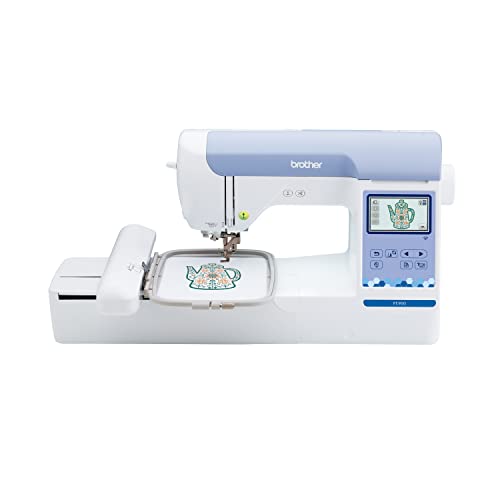
Seasoned embroiderers and tech-savvy beginners will appreciate Brother’s PE900, a dedicated embroidery powerhouse with wireless connectivity and an extensive design library. You’ll get 193 built-in designs, including 13 fonts, and access to 50 more free patterns through the Artspira app.
The 5″ x 7″ embroidery field handles larger projects, while the 3.7-inch LCD touchscreen lets you edit, resize, and combine designs effortlessly. Features like Advanced Color Sort and Jump Stitch Trimming streamline your workflow. Though it’s embroidery-only, the PE900’s sturdy construction, automatic needle threader, and wireless file transfer capabilities make it a solid investment for creative enthusiasts.
Best For: Crafters and hobbyists seeking a dedicated embroidery machine with modern connectivity features and a robust design library, particularly those who don’t need regular sewing capabilities.
Pros:
- Wireless connectivity and Artspira app integration for easy design transfer and creation
- Large 5″ x 7″ embroidery field with 193 built-in designs and 13 fonts
- User-friendly 3.7-inch LCD touchscreen with advanced editing capabilities
Cons:
- Limited to embroidery only – no standard sewing functions
- Some built-in designs may appear outdated
- Higher price point compared to combo sewing/embroidery machines
Janome Memory Craft 500e LE Embroidery Machine

Featuring 160 built-in designs and a generous 7.9″ x 11″ embroidery field, Janome’s Memory Craft 500e LE stands out as a top choice for home crafters who want professional-level embroidery without industrial complexity.
You’ll appreciate its user-friendly features, including a full-color LCD touchscreen, automatic thread cutter, and advanced needle threader. The machine’s on-screen editing functions let you easily resize, rotate, combine, and customize designs. With speeds up to 860 stitches per minute and four included hoops, you can tackle projects quickly. While some users report needle threader issues, proper maintenance and thread selection help guarantee peak performance.
Best For: Hobbyist embroiderers and home crafters seeking a versatile machine with professional features and extensive design capabilities without requiring industrial-level complexity.
Pros:
- Large embroidery field (7.9″ x 11″) with 160 built-in designs and 6 fonts
- Comprehensive on-screen editing capabilities with intuitive touchscreen interface
- Fast stitching speed up to 860 SPM with automatic thread cutting
Cons:
- Reported issues with needle threader reliability
- Mixed experiences with customer service and warranty support
- May require additional equipment for expanded design library access
Smartstitch S-1501 Ultra Embroidery Machine (15 Needles)

Professional embroiderers seeking commercial-grade performance will find their match in Smartstitch’s S-1501 Ultra, a powerhouse machine equipped with 15 needles and a generous 20×14 inch workspace. You’ll appreciate its 1200 SPM speed and enhanced cap driver made with reinforced nylon and carbon fiber.
The 12-inch touchscreen and wifi connectivity make operation seamless, while the laser positioning and automatic color change features boost efficiency. You’ll get extensive support through the Smartstitch club, training videos, and dedicated engineers. The machine handles everything from denim to leather, and users consistently praise its stitch quality and durability. The included starter pack gets you embroidering right away.
Best For: Professional embroiderers and small business owners seeking a commercial-grade machine with versatile capabilities and comprehensive training support.
Pros:
- High-performance 15-needle system with 1200 SPM speed and large 20×14 workspace
- Advanced features including laser positioning, wifi connectivity, and automatic color changes
- Comprehensive support through training videos, club membership, and dedicated engineering team
Cons:
- Significant investment for beginners or hobby embroiderers
- Requires dedicated space due to large embroidery area
- Learning curve may be steep for those new to commercial embroidery
Brother SE700 Sewing and Embroidery Machine

The Brother SE700 combines versatility with user-friendly features, making it an ideal choice for both beginners and intermediate embroiderers. You’ll appreciate its 3.7-inch color touchscreen that lets you preview and edit designs before stitching. With 135 built-in embroidery designs and 103 sewing stitches, you’ve got plenty of creative options.
The machine’s wireless connectivity enables you to transfer designs via WiFi or use the Artspira app to create custom patterns. While the 4×4 embroidery area might limit larger projects, you’ll find it perfect for standard home decor and apparel work. The automatic needle threader, jam-resistant bobbin, and speeds up to 710 spm enhance your crafting experience.
Best For: Hobbyists and home crafters seeking a versatile machine that combines basic sewing with embroidery capabilities, particularly suited for beginners who want user-friendly features and wireless connectivity.
Pros:
- Intuitive 3.7-inch color touchscreen with easy design editing capabilities
- Wireless connectivity for seamless design transfer and Artspira app compatibility
- Comprehensive set of built-in designs and stitches with automatic features like needle threading
Cons:
- Limited 4×4 embroidery area restricts larger project capabilities
- Requires additional purchases of materials like stabilizer and colored thread
- Machine’s throat space may be insufficient for substantial quilting projects
Factors to Consider When Choosing a Rated Home Embroidery Machine
When selecting your ideal home embroidery machine, you’ll want to evaluate essential features like the embroidery field size and built-in design library that match your project needs. Your machine’s stitching speed and connectivity options will determine how efficiently you can complete projects and transfer custom designs. Consider the needle threading system‘s ease of use, as you’ll frequently change threads during complex embroidery work.
Embroidery Field Size Comparison
Selecting an embroidery machine with the right field size can make or break your crafting experience. You’ll find options ranging from compact 4″ x 4″ fields in machines like the Brother Skitch to expansive 20″ x 14″ areas in the Smartstitch S-1501 Ultra.
For home use, you’ll need to match the field size to your project goals. If you’re planning small designs like monograms, a 4″ x 4″ field will suffice. Mid-range machines like the PE900 with its 5″ x 7″ field offer more versatility for moderate projects. For larger, more intricate designs, consider machines like the Janome Memory Craft 500e with its generous 7.9″ x 11″ workspace. Remember, a larger field size means fewer re-hoopings and increased efficiency, particularly if you’re tackling commercial-scale projects.
Built-in Design Library
Once you’ve determined the right embroidery field size, your next major consideration should be the machine’s built-in design library. A thorough design collection will save you time and boost your creative possibilities without requiring extra software purchases.
Today’s top machines feature hundreds of pre-loaded designs and multiple font options for monogramming, letting you start personalizing projects immediately. You’ll want to look for machines that offer on-screen editing capabilities so you can resize, rotate, and combine designs to match your vision. Additionally, consider how you can expand your design collection over time – the best machines allow you to download new patterns through apps or purchase additional design packs online. This flexibility guarantees you’ll always have fresh options for your embroidery projects.
Machine Speed Requirements
As you explore home embroidery machines, understanding their speed capabilities will greatly impact your project efficiency. Look for models that offer speeds between 400 to 1200 stitches per minute, which will help you complete intricate designs more quickly without sacrificing quality.
You’ll want to choose a machine with adjustable speed settings, allowing you to slow down for detailed work and speed up for larger, less complex areas. This flexibility is especially valuable when you’re working on challenging patterns or delicate fabrics. If you’re new to embroidery, start with a machine that offers moderate speeds while you develop your skills. Remember that faster isn’t always better – consider how the machine’s speed rating balances with its overall durability and reliability for long-term use.
Connectivity Options Available
Modern connectivity features have revolutionized how embroidery machines interact with your design software and mobile devices. You’ll find that today’s machines offer wireless options like WLAN and Bluetooth, making it easier to transfer your embroidery designs without dealing with cables.
You can quickly import personalized files in formats like PES and DST directly from your phone or tablet. These wireless capabilities let you access and edit designs through mobile apps, expanding your creative possibilities. If you prefer traditional methods, many machines still include design database transfer software for USB connections through your home network.
Don’t forget to check that your machine’s software stays up-to-date, as regular updates guarantee you’ll have access to new features and designs through your connected apps and platforms.
Needle Threading System
The needle threading system represents an essential factor in your embroidery machine selection, with automatic threaders leading the pack in user-friendly features. When you’re choosing your machine, look for models that combine automatic needle threading with jam-resistant drop-in bobbins, as this pairing will significantly lessen your setup time and potential frustrations.
You’ll want to evaluate machines that offer programmable jump thread trimming, which automatically cuts threads between color changes, making your embroidery process more efficient. The system’s quality directly affects your stitch consistency, so don’t compromise on this feature. Many modern machines now include helpful on-screen threading guides, making the entire process more intuitive. These visual aids are particularly valuable if you’re new to embroidery or upgrading from a basic model.
Price Range Analysis
When investing in a home embroidery machine, you’ll find distinct price tiers that align with different skill levels and needs. Entry-level machines ($200-$600) offer basic features perfect for beginners, though they’ll have fewer built-in designs and limited editing options.
If you’re looking for more versatility, mid-range models ($600-$2,000) provide larger embroidery areas, expanded design libraries, and user-friendly touchscreens. For serious enthusiasts or small business owners, high-end machines ($2,000+) deliver professional-grade features with superior stitch speeds and extensive design capabilities.
Remember to factor in additional costs beyond the machine’s price tag. You’ll likely need to budget for software subscriptions, design collections, and essential accessories to maximize your embroidery potential.
Software Compatibility Features
Software compatibility stands as an essential factor in selecting your ideal home embroidery machine, particularly as digital design capabilities continue to evolve. You’ll want to look for machines that work seamlessly with mobile apps like Artspira, giving you access to thousands of designs at your fingertips.
Consider machines offering wireless connectivity through WLAN or Bluetooth, which lets you transfer designs without USB cables. Make sure your chosen machine supports common file formats like PES, PHC, PHX, and DST to maximize your design options. On-screen editing capabilities are important, allowing you to resize, rotate, and combine designs directly on the machine. For advanced users, look for extensive software platforms that include digitizing tools and portrait conversion features, which will greatly expand your creative possibilities.
Hoop Size Options
Beyond software capabilities, hoop size plays a defining role in what you’ll be able to create with your embroidery machine. Standard 4″ x 4″ hoops work well for small designs, but you’ll want to take into account machines offering 5″ x 7″ or 7.9″ x 11″ options if you’re planning larger projects like home décor or garment designs.
When selecting your machine, remember that larger hoops open up more possibilities – you can stitch multiple smaller designs simultaneously or tackle ambitious single-piece projects. However, you’ll need to factor in that machines accommodating bigger hoops typically require more workspace. Look for models that come with multiple hoop sizes, as this versatility will let you efficiently handle both intricate detail work and expansive designs without limiting your creative options.